 探客时代
探客时代

marky
High-resolution JavaScript timer based on performance.mark/measure (491 byt...
README
marky
======
JavaScript timer based on performance.mark() and performance.measure(), providing [high-resolution
timings](https://developer.mozilla.org/en-US/docs/Web/API/User_Timing_API) as well as nice Dev Tools visualizations.
For browsers that don't support performance.mark(), it falls back to
performance.now() or Date.now(). In Node, it uses process.hrtime().
Quick start
Install via npm:
npm install marky
Or as a script tag:
- ``` html
- <script src="https://unpkg.com/marky/dist/marky.min.js"></script>
- ```
Then take some measurements:
- ``` js
- var marky = require('marky');
- marky.mark('expensive operation');
- doExpensiveOperation();
- marky.stop('expensive operation');
- ```
Why?
The User Timing API is more performant
than console.time() and console.timeEnd(),
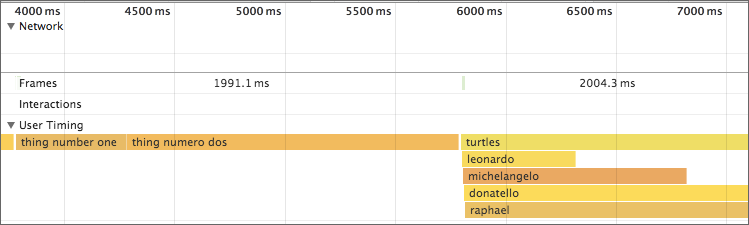
and more accurate thanDate.now(). Also, you get nice visualizations in Chrome Dev Tools:
As well as Edge F12 Tools:
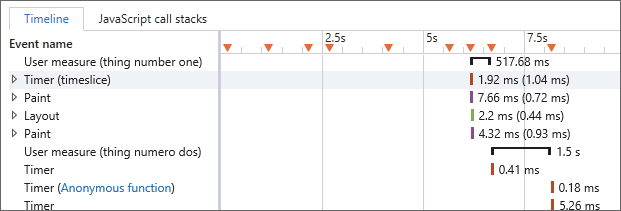
This is because marky adds standard
PerformanceEntries to the Performance Timeline. Tools like WebPageTest and Windows Performance Analyzer also surface them, and you can even send them to your analytics provider.
API
marky.mark() begins recording, and marky.stop() finishes recording:
- ``` js
- marky.mark('releaseTheHounds');
- releaseTheHounds();
- marky.stop('releaseTheHounds');
- ```
You can also do more complex scenarios:
- ``` js
- function setSail() {
- marky.mark('setSail');
- marky.mark('raiseTheAnchor');
- raiseTheAnchor();
- marky.stop('raiseTheAnchor');
- marky.mark('unfurlTheSails');
- unfurlTheSails();
- marky.stop('unfurlTheSails');
- marky.stop('setSail');
- }
- ```
marky.stop() also returns a PerformanceEntry:
- ``` js
- marky.mark('manTheTorpedos');
- manTheTorpedos();
- var entry = marky.stop('manTheTorpedos');
- ```
The entry will look something like:
- ``` json
- {
- "entryType": "measure",
- "startTime": 1974112,
- "duration": 350,
- "name": "manTheTorpedos"
- }
- ```
You can get all entries using:
- ``` js
- var entries = marky.getEntries();
- ```
This provides a list of all measures ordered by startTime, e.g.:
- ``` json
- [
- {
- "entryType": "measure",
- "startTime": 1974112,
- "duration": 350,
- "name": "numberOne"
- },
- {
- "entryType": "measure",
- "startTime": 1975108,
- "duration": 300,
- "name": "numberTwo"
- },
- {
- "entryType": "measure",
- "startTime": 1976127,
- "duration": 250,
- "name": "numberThree"
- }
- ]
- ```
You can also clear the entries using marky.clear():
- ``` js
- marky.clear()
- ```
After this, marky.getEntries() will return an empty list. (If the User Timing API is supported, this will delete all the mark and measure entries from the timeline.)
Browser support
marky has been tested in the following browsers/environments:
IE 9+
Safari 8+
iOS 8+
Android 4.4+
Chrome
Firefox
Edge
Node 4+
Per the spec, browsers only need to hold a minimum
of 150 entries in their Performance Timeline buffer. In older versions of Firefox, the buffer
is throttled to 150, which for marky
means you can get a maximum of 50 entries from marky.getEntries() (because marky creates two marks and a measure).
If you need to get more than 50 entries from marky.getEntries(), you can do:
- ``` js
- if (typeof performance !== 'undefined' && performance.setResourceTimingBufferSize) {
- performance.setResourceTimingBufferSize(10000); // or however many you need
- }
- ```
In Node and browsers that don't support the User Timing API,
marky follows the behavior of Edge and Chrome, and does not limit the number of entries. marky.stop() and
marky.getEntries() will return pseudo-PerformanceEntry objects.
See also
Credits
Thanks to @toddreifsteck for feedback on this project and clarifications on the User Timing API.

