探客时代
探客时代

Newcar
A modern animation engine for JavaScript ecosystem, which is based on Skia ...
README
Newcar
A modern animation engine for JavaScript ecosystem
📔 Introduction
Newcar is a highly configurable and advanced universal engine designed for rapid animation creation. It is suitable for a wide range of applications, including video clips, dynamic charts (planned for the future), and even 2D game development (also planned for the future).
🌟 Features
- Rich API Interfaces 🛠️: Offers powerful and diverse APIs, providing you with greater flexibility in animation creation.
- Based on CanvasKit-WASM 🧬: Utilizes CanvasKit-WASM to minimize communication and data exchange between the CPU and GPU, ensuring robust animation performance.
- High Degree of Customization ⚙️: Features strong customizability, allowing you to create unique animation styles.
- Chain Syntax ⛓️: Enables the use of chain syntax for a more efficient development process, eliminating the need to save objects into variables.
🚗 Future plans
1. From the mods directory under the project root directory, it can be seen that newcar has already released mathematical modules (including number axes, planar Cartesian coordinate systems, function images, etc.). Unpublished modules include: geometry module, markup module, dynamic chart module, UI module, physics module, mind map module, etc
2. In the future, an event system will be launched to turn it into a two in one engine for animation games
3. Some small things, such as animation trees
⌨️ Getting Started
Creating a Project
Although Newcar can be used in various ways, we recommend using Vite for project creation and PNPM for package management.
- ```shell
- $ pnpm create vite project-name
- $ cd project-name
- $ pnpm install
- ```
Next, select your preferred framework.
Installation
- ```shell
- $ pnpm add newcar
- ```
You will also need to install CanvasKit-WASM. For quick setup, we recommend using the CDN version.
Initialization
- ```typescript
- import * as nc from 'newcar'
- const engine = await new nc.Engine().init(
- '../node_modules/canvaskit-wasm/bin/canvaskit.wasm',
- )
- const defaultScene = new nc.Scene(new Widget())
- engine.createApp().checkout(defaultScene).play()
- ```
1. Await init() until CanvasKit is fully loaded.
2. Create a Scene with a root widget as its first parameter.
3. Check out to the defaultScene and play the animation.
Simple, right? Let's dive deeper.
Adding Widgets as Root's Children
Now, let's add some excitement.
- ```typescript
- const engine = await new nc.Engine().init(
- '../node_modules/canvaskit-wasm/bin/canvaskit.wasm',
- )
- const defaultScene = new nc.Scene(new Widget().add(new nc.Circle(100)))
- engine.createApp().checkout(defaultScene).play()
- ```
Animating It
- ```typescript
- const engine = await new nc.Engine().init(
- '../node_modules/canvaskit-wasm/bin/canvaskit.wasm',
- )
- const defaultScene = new nc.Scene(
- new Widget().add(new nc.Circle(100).animate(nc.create, 0, 30)),
- )
- ```
These codes will add a create animation to the Circle object.
If everything is set up correctly, you will see a circle drawn on the canvas.
📖 Documentation
- The tutorials is available at newcarjs.org
- The API References is available at apis.newcarjs.org
- The Playground is deployed at playground.newcarjs.org
_Copyright (c) 2022-present, BugDuck Team & Dromara Community_
Note: Newcar is a open-source project which belong to Dromara Community and maintained by BugDuck Team. The members of BugDuck just join with a personal identity, BugDuck Team will always keep its independence
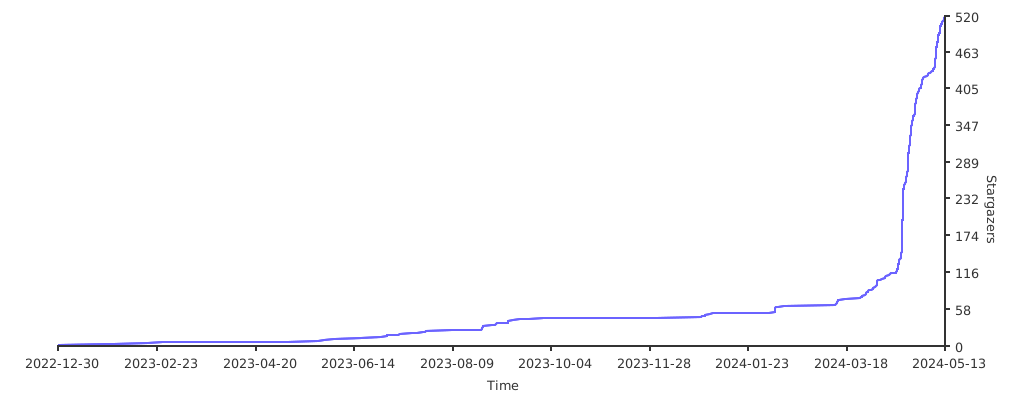
✨ Stargazers over time