 探客时代
探客时代

Surplus
High performance JSX web views for S.js applications
README
Surplus
- ```jsx
- const name = S.data("world"),
- view = <h1>Hello {name()}!</h1>;
- document.body.appendChild(view);
- ```
Surplus is a compiler and runtime to allow S.js applications to create high-performance web views using JSX. Thanks to JSX, your views are clear, declarative definitions of your UI. Thanks to Surplus' compiler, they are converted into direct DOM instructions that run fast. Thanks to S, they react automatically and efficiently as your data changes.
The Gist
Surplus treats JSX like a macro language for native DOM instructions.
- ```jsx
- const div = <div/>;
- // ... compiles to ...
- const div = document.createElement("div");
- // more complicated expressions are wrapped in a function
- const input = <input type="text"/>;
- // ... compiles to ...
- const input = (() => {
- var __ = document.createElement("input");
- __.type = "text";
- return __;
- })();
- ```
These DOM instructions create real DOM nodes that match your JSX. There's no virtual DOM middle layer standing between your JSX and the DOM.
DOM updates are handled by S computations.
- ```jsx
- const className = S.data("foo"),
- div = <div className={className()}/>;
- // ... compiles to ...
- const className = S.data("foo"),
- div = (() => {
- var __ = document.createElement("div");
- S(() => {
- __.className = className(); // re-runs if className() changes
- });
- return __;
- })();
- ```
The computations perform direct, fine-grained changes to the DOM nodes. Updates run fast while keeping the DOM in sync with your JSX.
Finally, Surplus has a small runtime to help with more complex JSX features, like property spreads and variable children.
- ```jsx
- import * as Surplus from 'surplus';
- const div = <div {...props} />;
- // ... compiles to ...
- const div = (() => {
- var __ = document.createElement("div");
- Surplus.spread(__, props);
- return __;
- })();
- ```
Installation
- ```sh
- > npm install --save surplus s-js
- ```
Like React, Surplus has two parts, a compiler and a runtime.
Runtime
The Surplus runtime must be imported as Surplus into any module using Surplus JSX views.
- ```javascript
- import * as Surplus from 'surplus'; // ES2015 modules
- const Surplus = require('surplus'); // CommonJS modules
- ```
Compiler
The easiest way to run the Surplus compiler is via a plugin for your build tool:
- Webpack: surplus-loader
- Rollup: rollup-plugin-surplus
- Gulp: gulp-surplus
- Browserify: surplusify
- Parcel: parcel
If you aren't using one of these tools, or if you want to write your own plugin, see Calling the surplus compiler.
Example
Here is a minimalist ToDo application, with a demo on CodePen:
- ```jsx
- const
- Todo = t => ({ // our Todo constructor
- title: S.data(t.title), // properties are S data signals
- done: S.data(t.done)
- }),
- todos = SArray([]), // our todos, using SArray
- newTitle = S.data(""), // title for new todos
- addTodo = () => { // push new title onto list
- todos.push(Todo({ title: newTitle(), done: false }));
- newTitle(""); // clear new title
- };
- const view = // declarative main view
- <div>
- <h2>Minimalist ToDos in Surplus</h2>
- <input type="text" fn={data(newTitle)}/>
- <a onClick={addTodo}> + </a>
- {todos.map(todo => // insert todo views
- <div>
- <input type="checkbox" fn={data(todo.done)}/>
- <input type="text" fn={data(todo.title)}/>
- <a onClick={() => todos.remove(todo)}>×</a>
- </div>
- )}
- </div>;
- document.body.appendChild(view); // add view to document
- ```
Note that there is no .mount() or .render() command. Since the JSX returns real nodes, we can attach them to the page with standard DOM commands, document.body.appendChild(view).
Note also that there's no code to handle updating the application: no .update() command, no .setState(), no change event subscription. Other than a liberal sprinkling of ()'s, this could be static code.
This is because S is designed to enable declarative programming, where we focus on defining how things should be and S handles updating the app from one state to the next as our data changes.
Surplus lets us extend that model to the DOM. We write JSX definitions of what the DOM should be, and Surplus generates runtime code to maintain those definitions.
Declarative programs aren't just clear, they're also flexible. Because they aren't written with any specific changes in mind, they can often adapt easily to new behaviors. For instance, we can add localStorage persistence with zero changes to the code above and only a handful of new lines:
- ```javascript
- if (localStorage.todos) { // load stored todos on start
- todos(JSON.parse(localStorage.todos).map(Todo));
- }
- S(() => { // store todos whenever they change
- localStorage.todos = JSON.stringify(todos().map(t =>
- ({ title: t.title(), done: t.done() })));
- });
- ```
More examples of Surplus programs:
- The standard TodoMVC in Surplus, which you can run here
- The Realworld Demo in Surplus, a full-fledged Medium-like app demonstrating routing, authentication and server interaction, based on the Realworld spec.
Benchmarks
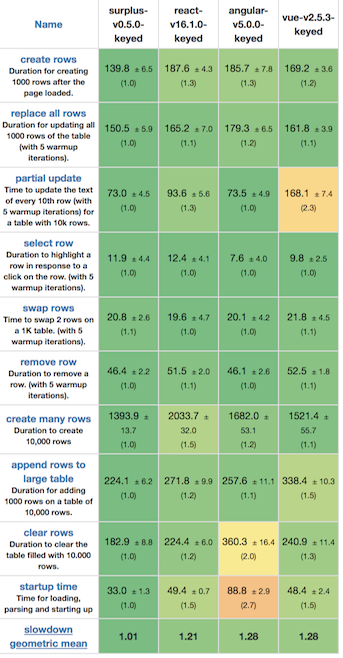
Direct DOM instructions plus S.js's highly optimized reactivity means that Surplus apps generally place at or near the top of various performance benchmarks.
For example, Surplus is currently the top framework in Stefan Krause's js-framework-benchmark:
Documentation
Creating HTML Elements
- ```jsx
- const div = <div></div>, // an HTMLDivElement
- input = <input/>; // an HTMLInputElement
- // ... etc
- ```
JSX expressions with lower-cased tags create elements. These are HTML elements, unless their tag name or context is known to be SVG (see next entry).
Creating SVG Elements
- ```jsx
- const svg = <svg></svg>, // SVGSVGElement
- svgCircle = <circle/>, // SVGCircleElement
- svgLine = <line/>; // SVGLineElement
- // ... etc
- ```